~/your-project $ maestrun start
Conduct your coding agents.
Maestrun turns your requirements into a plan you review, then runs every task through Planning → Implementation → Tests with Codex, Claude Code, GitHub Copilot CLI, or Grok Build. Pick the executor, model and effort for each stage. Ready to use in a few minutes.
npm install --global @maestrun/maestrun@betaAll 4Working 1Done 1Waiting 1Issues 1
~/demo/.maestrun/samples/run-01XNLZ
1/4 tasks · 4/16 steps · 25% · 1:14
| Task | Name | in/out | Status | Stage | Model | Effort | Steps |
|---|---|---|---|---|---|---|---|
| Demonstrate an independent failure | 48K/402 | Failed | Implementation | gpt-6.1-sol | – | 0/4 | |
| Add two numbers independently | 170K/1228 | Done | – | gpt-6.1-sol | – | 4/4 | |
| Clamp a value and demonstrate one QA repair | 102K/852 | Working | Implementation | gpt-6.1-sol | medium | 0/4 | |
| Use both integrated results | n/a | Waiting | – | gpt-6.1-sol | – | 0/4 |
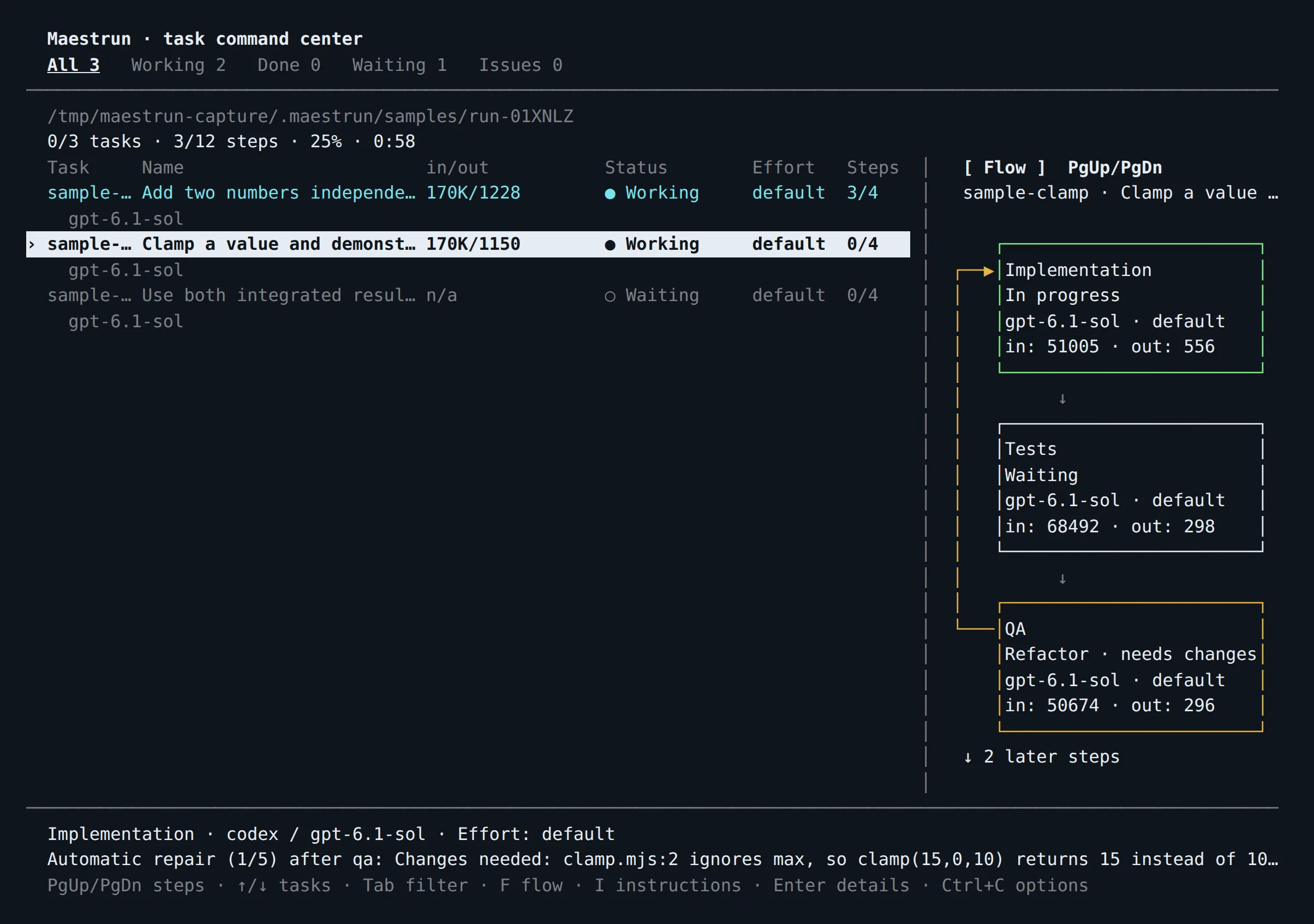
[ Flow ] PgUp/PgDn
sample-clamp · Clamp a value and demonstrate one QA repair
- ImplementationIn progressgpt-6.1-sol · mediumin: 51005 · out: 556
- TestsWaitinggpt-6.1-sol · lowin: n/a · out: n/a
- QARefactor · needs changesgpt-6.1-sol · highin: 50674 · out: 296
- IntegrationWaitingGit · localno model calls
Automatic repair (1/5) after qa: Changes needed: clamp.mjs:2 ignores max, so clamp(15,0,10) returns 15 instead of 10
PgUp/PgDn steps · ↑/↓ tasks · Tab filter · F flow · I instructions · Enter details · Ctrl+C options
maestrun sample advanced with codex / gpt-6.1-sol, built from real captures. Effort levels per stage show the setting; token counts are illustrative. One task fails on purpose while the others finish. Click a task to follow its flow.New Maestrun for VS Code 1.0
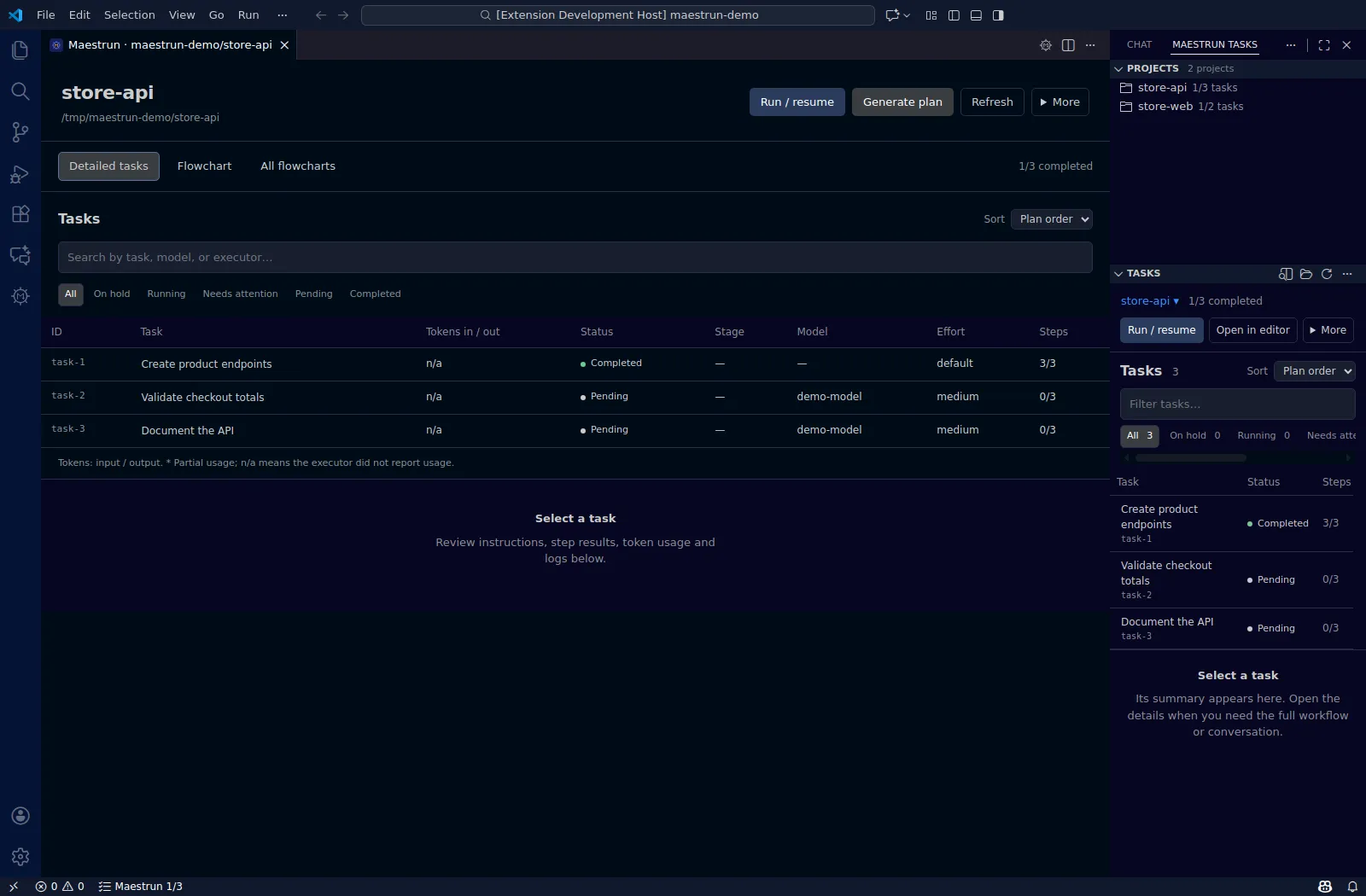
Prefer your editor? Skip the terminal.
The Maestrun extension for VS Code puts the whole workflow behind buttons: set up the workflow, generate the plan, run or resume, answer a task that is waiting for you, and follow every stage in a flowchart, right next to your code. Several projects at once, each with its own dashboard.
- Set executor, model and effort per step in an editable table.
- Click any stage of a task to read its result and logs.
- Run the Simple or Advanced example from the Command Palette.
Why Maestrun hits the mark.
- 1
Quick to set up
Install from npm, run maestrun start, pick an executor and model. Environment checks catch setup problems before planning.
- 2
Easy to run
Review the plan, start the run, and follow every task live in the terminal, in the foreground or background.
- 3
Highly customizable
Stages, executor, model and effort per stage, Markdown steps and terminal layout, all in readable JSON.
- 4
Any agent, any stage
Codex, Claude Code, GitHub Copilot CLI or Grok Build, used alone or mixed across stages.
- 5
Repairs itself
A failed check sends the task back to Implementation, up to 5 times per task by default.
- 6
Resumes where it stopped
Completed stages are checkpointed in run.json. Detach with Ctrl+C and reconnect any time.
- 7
Runs in parallel
Each task gets its own Git worktree and is merged back into your project when its stages pass.
- 8
Reusable everywhere
Save a workflow as a template and import it in another project or on another machine.
Every stage. Its own model.
Let Planning think hard while Tests stay quick. Each stage gets its own executor, exact model and effort level, or you use one for the whole workflow. Edit the stages below; the config.json Maestrun reads updates as you go. Add as many steps as you need: QA, Review, or your own written in Markdown.
| Stage | Executor | Model | Effort |
|---|---|---|---|
| Planning | |||
| Implementation | |||
| Tests |
Add as many steps as you need 3 stages
Your own steps run from Markdown instructions in .maestrun/steps/. Model IDs here are placeholders: enter an exact ID your account can use. Effort lists show what each executor accepts.
{
  "version": 1,
  "stages": [
    {
      "id": "planning",
      "executor": "claude",
      "model": "your-claude-model",
      "effort": "high"
    },
    {
      "id": "implementation",
      "executor": "codex",
      "model": "your-codex-model",
      "effort": "medium"
    },
    {
      "id": "testing",
      "executor": "copilot",
      "model": "your-copilot-model"
    }
  ],
  "execution": {
    "mode": "sequential"
  }
}
Same thing from the terminal: maestrun config stages planning effort high
Simple to start.
Install the CLI.
npm install --global @maestrun/maestrun@betaOpen your project and start.
cd your-project && maestrun startMaestrun checks your environment, then asks for an executor, an exact model, and Standard or Customize.
Describe your requirements, review the task preview, and start the run.
Standard uses the same executor and model for Planning → Implementation → Tests, in sequence. Existing configuration, plans and progress are reused when you run maestrun start again.
Rather click than type? The VS Code extension does the same setup, planning and run from buttons in your editor.
Highly customizable.
- .maestrun/per project
- config.jsonstages; executor, model and effort per stage; sequential or parallel; concurrency 1–16; repairs 0–100; timeout
- steps/*.mdyour own workflow steps in Markdown, as many as you need
- layout.jsonterminal columns and flowchart position
- run.jsoncheckpoints that make runs resumable
- ~/.maestrun/for every project
- config.jsonglobal defaults and step presets
- templates/saved workflows to reuse, export and import
terminal
maestrun init --advanced                     # full workflow editor
maestrun config stages planning effort high  # tune one stage
maestrun config execution.maxRepairs 3       # change the repair limit
maestrun template save my-workflow           # reuse it anywhere
maestrun template export team.json # hand it to your teamPlan first. Then run.
The plan is a Markdown task list you can read and edit before anything executes. Each task then walks through its stages; when a model reports a failure, Maestrun restarts at Implementation, up to five times by default. If a task still fails, independent tasks keep going, dependants wait, and the failed task stays on screen with its error. When a task needs you (a decision, an approval, a login), it pauses with its question while the rest keep running; answer it and it resumes the same stage. Completed work is checkpointed, and replanning keeps finished tasks, so a stopped run picks up where it left off.
This is the actual terminal.
A real capture of maestrun sample advanced: QA asked for changes, so the clamp task went back to Implementation for an automatic repair. The flowchart shows the loop as it happens.
Press Enter on any task to read what each step concluded, with its status and token usage, in workflow order. Press L for the full recorded conversation of every step, including the instructions you sent, and L again to return to the results. Logs are saved with the run, so they are still there after a failure or when you reconnect.
- Enter
- Open task details: each step's result and tokens
- L
- In task details, switch to the full logs of each step
- F
- Toggle the stage flowchart
- I
- Answer a task waiting for you, or send instructions to a running one
- H
- Show only tasks waiting for your answer
- Tab
- Filter by status
- Ctrl+C
- Move the run to the background, or cancel
Try it: maestrun sample · maestrun sample advanced
Bring your own agents.
Maestrun doesn't replace your coding agent; it conducts it. Install and sign in to at least one executor. Planning, execution, and samples run on your executor account.
| Executor | Install | Sign in |
|---|---|---|
| Codex | npm install -g @openai/codex | codex login |
| Claude Code | Installation guide | claude auth login |
| GitHub Copilot CLI | npm install -g @github/copilot | copilot login |
| Grok Build | npm install -g @xai-official/grok | grok login |
Stop anytime. Resume.
| Command | What it does |
|---|---|
maestrun doctor | Check installation, authentication, files, and locks |
maestrun run --dry-run | Preview tasks without model calls |
maestrun run | Run or resume unfinished tasks |
maestrun run --background | Start execution in the background |
maestrun | Reconnect to a background session |
maestrun run --status | Read the saved report |
What's new.
- 0.1.1-beta.5betaNEWEST## Changes
- 0.1.1-beta.4betaARRIVEDMaestrun 0.1.1-beta.4 preserves progress when replanning, pauses tasks for user input, and makes sample workflows smaller.
- 0.1.1-beta.3betaARRIVEDMaestrun 0.1.1-beta.3 makes task results easier to inspect and demonstrates how independent work continues after a failure.
- 0.1.1-beta.2betaARRIVEDMaestrun 0.1.1-beta.2 adds documentation screenshots from real simple and advanced sample runs, including the automatic QA → Implementation repair flow.
Two commands to your first run.
npm install --global @maestrun/maestrun@beta cd your-project && maestrun startWorking in VS Code? Install the extension and start from the Maestrun icon instead.
Maestrun is in Beta (v0.1.1-beta.5). Bugs may occur; issues and pull requests are welcome. If it helps you ship, star it on GitHub so more people find it.